Opponent pack · start on the leak
Prep
Ke Jie and Wang Zejin. A one-page card plus 48 KataGo 400-visit leak drills. You sit in their seat and play the engine’s first choice. Not an empty board.
Open packs KyuAdvisor
Ask · Play
Same credits. The Chrome side panel is for kifu on sites you already use. Play is a full game in the browser: you take Black, KataGo takes White, then review. Not a subscription.
Three ways in
Opponent pack · start on the leak
Ke Jie and Wang Zejin. A one-page card plus 48 KataGo 400-visit leak drills. You sit in their seat and play the engine’s first choice. Not an empty board.
Open packsEmpty board · no extension
You take Black, KataGo takes White. Half a credit per engine move. After the game, review three mistakes (one credit) and drill the variations.
Play a gameWeb kifu · Chrome side panel
Open Fox, OGS, 101weiqi… Sync the position. Think first, then pull KataGo in — a hint, A · B · C, or a full note. One new position, one credit.
Install the extensionA real session
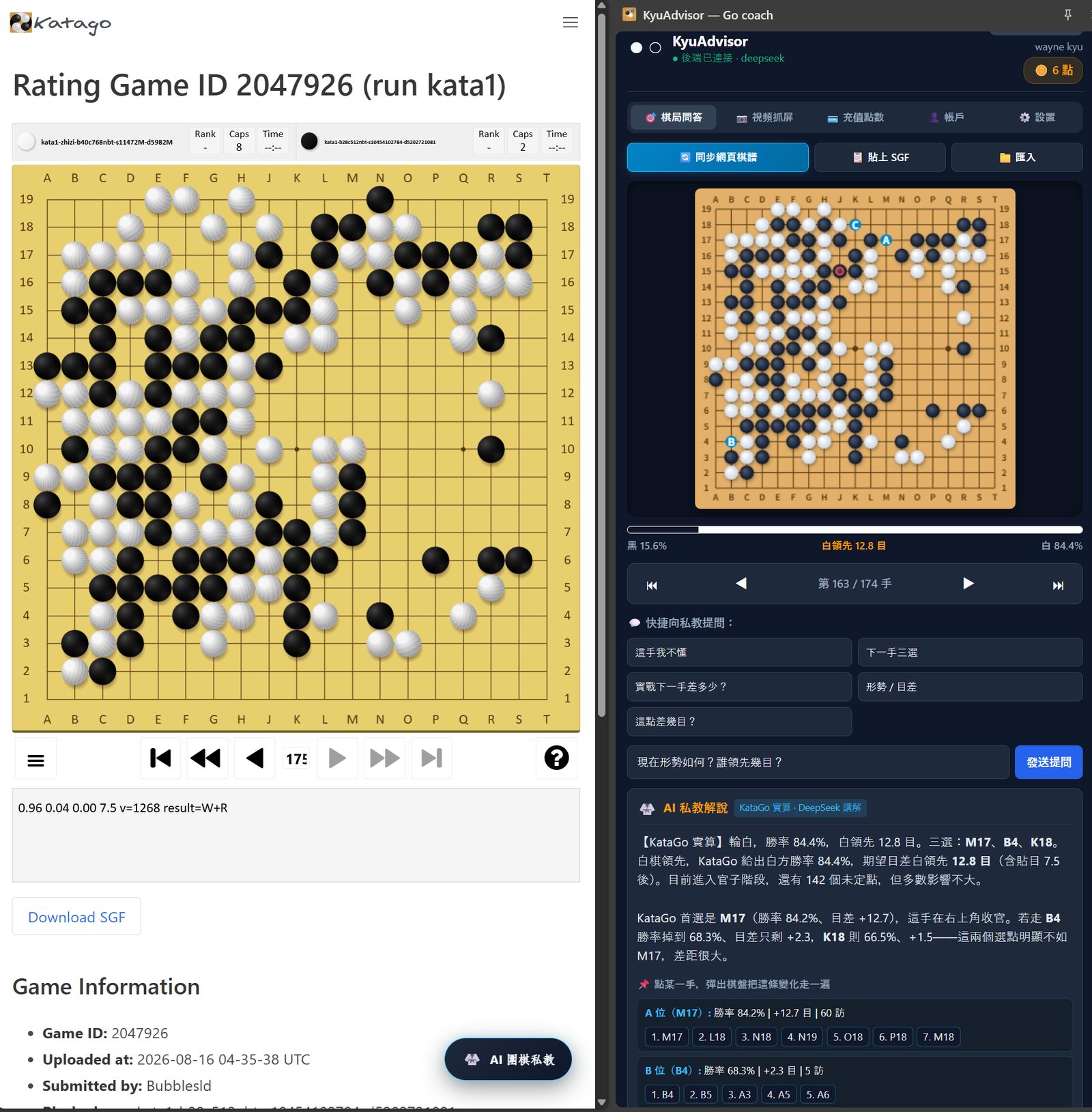
Left: a rating game on KataGo Training, move 175. Right: the KyuAdvisor side panel after “Sync page”. Same stones, same turn. The question was “Who is ahead, and by how many points?”
KataGo’s search said White was ahead, about 12.8 points, winning 84.4%. DeepSeek wrote that in a few sentences and marked the next three candidates: A M17, B B4, C K18. Click a letter to walk the variation. Arrow keys step the main line, same as the ◀ ▶ buttons.
A new question costs one credit. Asking the same thing again is free. Read the short note, or install the extension. To play a full game, go to Play.
Where it works
You stay on that website. The side panel either syncs the kifu, or captures one video frame. Site names are the same in every language.
Click “Sync page”. You get the moves and can step with ◀ ▶ or the arrow keys.
Open the “Capture” tab. One frame from the video — no move order. Ask about the lead or the next three points.
Any other page: paste an SGF or import a .sgf file.
Install KyuAdvisor as a Chrome side panel. Create an account with your email. This is a software product, not a physical good and not a class booking site.
Sync a game, paste an SGF, or capture a video board, then ask (1 credit). Or open Play and finish a game against KataGo (0.5 credit per engine move).
Open Credits in the side panel and pay through Stripe Checkout. Credits are added to your KyuAdvisor account when payment succeeds. There is no recurring charge and no auto-renewal.
Prices are charged in US dollars. Ask or review = 1 credit. Play = 0.5 credit per engine move (about 40–50 credits a game). Packs do not expire while the service is operating.
$4.99
100 credits
About one hundred position questions.
$9.99
300 credits
Better per-question price for regular review.
$19.99
1,000 credits
For frequent study. Lowest price per credit.
Not a subscription. We do not store your full card number. Payments are processed by Stripe. Statement descriptor suffix: KYUADV.
Refunds: kyuadvisor.com/refund. Privacy: /privacy. Terms: /terms.